
Wired vs wireless security cameras is a short contest for a business. Wired wins on reliability, video quality and security, and should be the default. Wireless earns its place in three situations: a spot cable can’t reach affordably, a space you aren’t allowed to drill, and a site that’s temporary.
The confusion starts with the word “wireless,” which covers three different products. Sort those out and most of the decision makes itself. We do wired camera installation for most commercial clients and use wireless links where they’re the right tool, so this isn’t a case against either one. It’s a guide to where each fails.

Three things people mean by “wireless”
Wi-Fi cameras. They send video over Wi-Fi but still plug into a power outlet. The cable you saved is the network cable, not the power cord.
Battery cameras. Sold as “wire-free.” No cables at all, which is why they’re popular at home. To make a battery last, they sleep until motion wakes them.
Wireless bridges. The one most buyers haven’t heard of. The cameras are ordinary wired models, and a pair of small radios carries the network across a gap, such as a parking lot. It’s how professionals put cameras on a detached building without trenching.
Wireless cameras fail in two ways, and both are fixable
Signal. Office Wi-Fi was designed for laptops in conference rooms, not for a camera on an exterior metal wall streaming all day. Metal buildings, distance and crowded channels cause dropouts, and a camera that drops for ten seconds has a ten-second hole in its recording. The fix is a dedicated access point or a bridge aimed at the cameras.
Power. Battery cameras miss the start of events, because waking up takes a second or two. They also run down fastest in the busiest locations, which are the ones you most wanted covered. The fix is permanent power: an outlet, a hardwired low-voltage feed, or a properly sized solar panel.
Our take: battery cameras are a fine supplement and a poor foundation. We wouldn’t make one the only camera on a door.
Reliability and video quality
A wired camera has its own cable, so it streams at full quality around the clock and nothing else on the network slows it down. If you want the mechanics, here’s how PoE cameras work. Wired systems record to an on-site recorder, covered in our NVR vs DVR guide, and keep recording when the internet is down.
Wi-Fi cameras share airtime with every phone and laptop in the building. Four of them streaming continuously is a real load on a small office network. Many are set to record only on motion for that reason, and motion-only recording is the difference between seeing the incident and seeing what led up to it.
Security: jamming and your network
A Wi-Fi camera can be knocked offline by interference or by a deliberate jammer. Operating a jammer is illegal under federal law, as the FCC’s jammer enforcement page makes clear. That doesn’t stop someone who’s already planning a burglary.
A wired camera can’t be jammed. Its cable can be cut, but a well-installed cable is inside the wall, and the recorder logs the moment a camera goes dark.
There’s a network angle too. Every camera, wired or wireless, is a small computer on your network. Wi-Fi cameras bought at retail tend to land on the same network as the accounting PC, tied to a cloud account under one employee’s personal email. Whichever type you choose, cameras belong on their own network segment with a company-owned login and multi-factor authentication.
Cost
Wired costs more on day one. In our market a cable drop typically runs $125 to $300 per camera, and that’s the bulk of the difference. After that there’s usually no monthly fee.
Wireless is cheaper to put up and often carries a subscription, commonly $3 to $15 per camera per month for cloud storage. Over five years, eight cameras at $10 a month is $4,800, which would have paid for the cable.
How long do security cameras keep footage?
Most business camera systems keep footage for 30 to 90 days before the oldest video is overwritten. Wired systems store it on a recorder you size yourself. Wireless cloud cameras keep whatever the subscription tier allows, often 7 to 30 days of motion clips, with longer retention at a higher price.
That gap matters when a problem surfaces late. An inventory shortage found at month-end, or a slip-and-fall claim that arrives six weeks after the fact, needs footage a 14-day cloud plan no longer has.
Retention should come from a requirement, not a default. Ask your insurer what they expect. If cameras cover a server room or other sensitive area that handles payment card data, the PCI Data Security Standard calls for at least three months.
Wired vs wireless security cameras: which to choose
Choose wired if:
- The cameras are permanent and the building is yours or on a long lease.
- You need continuous recording or more than 30 days of retention.
- You’re covering doors, registers or anything an insurer or the police will ask about.
Choose wireless if:
- The lease or the building’s historic status rules out new cable.
- One or two positions would cost more to cable than every other camera combined.
- The site is temporary: a job site, a pop-up, a seasonal lot.
The hybrid most businesses end up with
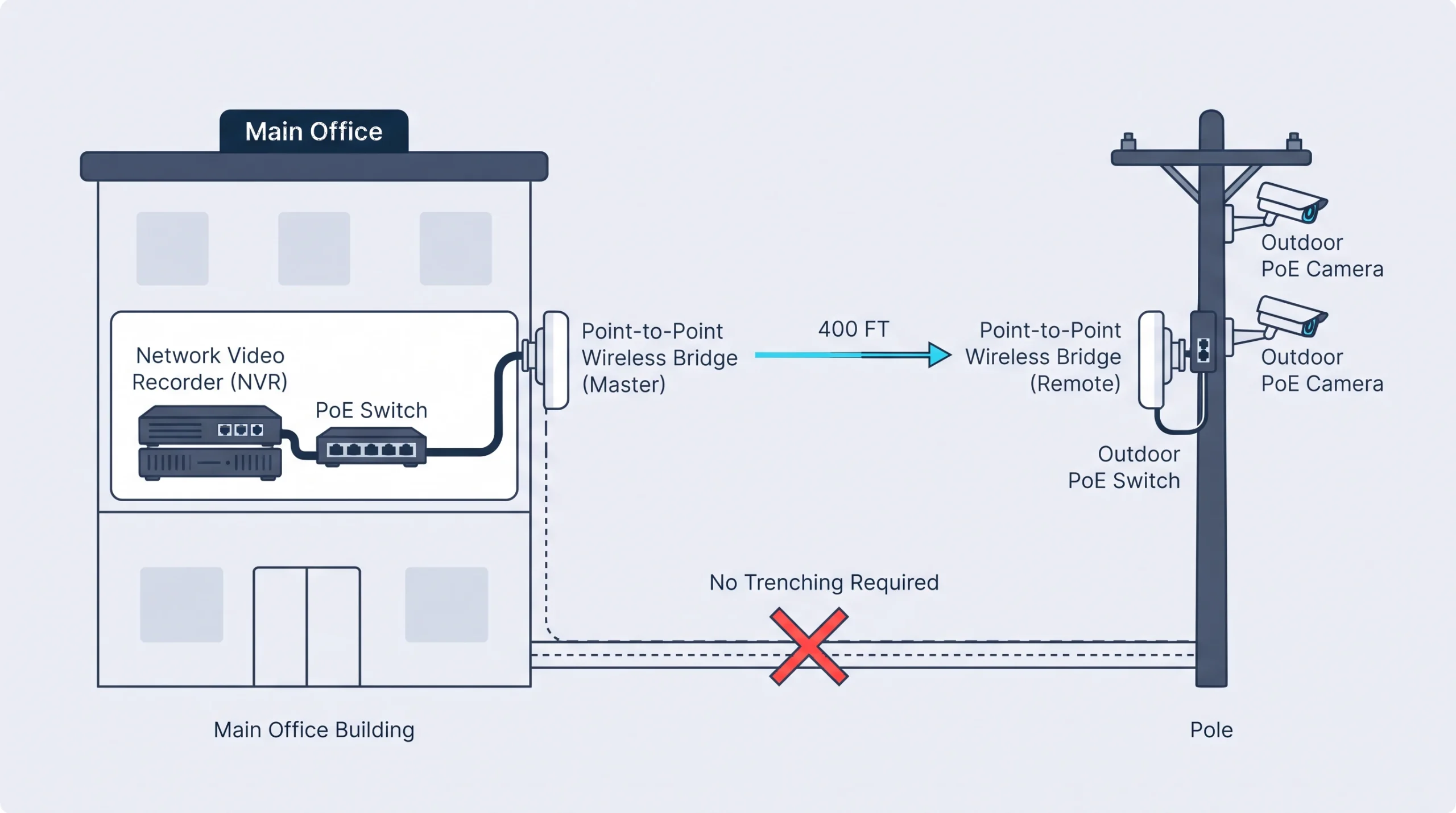
The best designs mix the two. Take a contractor’s office in Fort Worth with an equipment yard 400 feet behind the building. Trenching conduit across the yard for two cameras is the expensive way to do it, and the distance is past the 328-foot limit for Ethernet anyway.
The better design puts two wired PoE cameras on a pole in the yard, powered from the yard’s lighting circuit, with a point-to-point wireless bridge carrying video back to the recorder in the office. The cameras record continuously. The only wireless part is a dedicated link that carries nothing else. That’s a common layout when we design security cameras for Fort Worth businesses with yards, lots or outbuildings.
If it were our building: wired cameras on every door and every place money moves, a wireless bridge for anything across the lot, and battery cameras only where we’d otherwise have nothing.
Got one camera position that’s wrecking the quote? Describe the spot and we’ll tell you whether a bridge, a Wi-Fi camera or a different mounting point solves it.
Frequently Asked Questions
Are wired or wireless security cameras better?
Do wireless security cameras need Wi-Fi?
Can wireless security cameras be jammed?
Do wired security cameras work without internet?
Cable where you can, wireless where you must
That’s the whole rule. If part of your building has you leaning wireless, start by finding out what the network can support, since those cameras will depend on it. A network assessment answers that before any hardware is ordered.