
How many security cameras do I need? Most small businesses need 4 to 8, mid-size offices and stores need 8 to 16, and warehouses need 16 to 32 or more. The better answer is a count of jobs, not square feet: one camera for every door people use, one for every spot where money or inventory changes hands, and a few for context.
Package deals get this backwards. An “8-camera system” is sold before anyone walks the building, and the result is eight wide shots that prove something happened and can’t show who did it. That’s the difference professional camera system design makes: it starts from what each camera has to prove. Below are typical counts by building type, the pixel math behind them, and placement rules you can apply with a floor plan and a pencil.
Treat these as starting ranges. The method below is what turns a range into a number.
How many security cameras do I need? Count jobs, not square feet
Count the jobs each camera has to do. A camera can identify a person, recognize what’s happening, or give a wide overview, and it does only one of those well at a time. List every door, every cash or inventory point and every blind area, assign a job to each, and the total is your count.
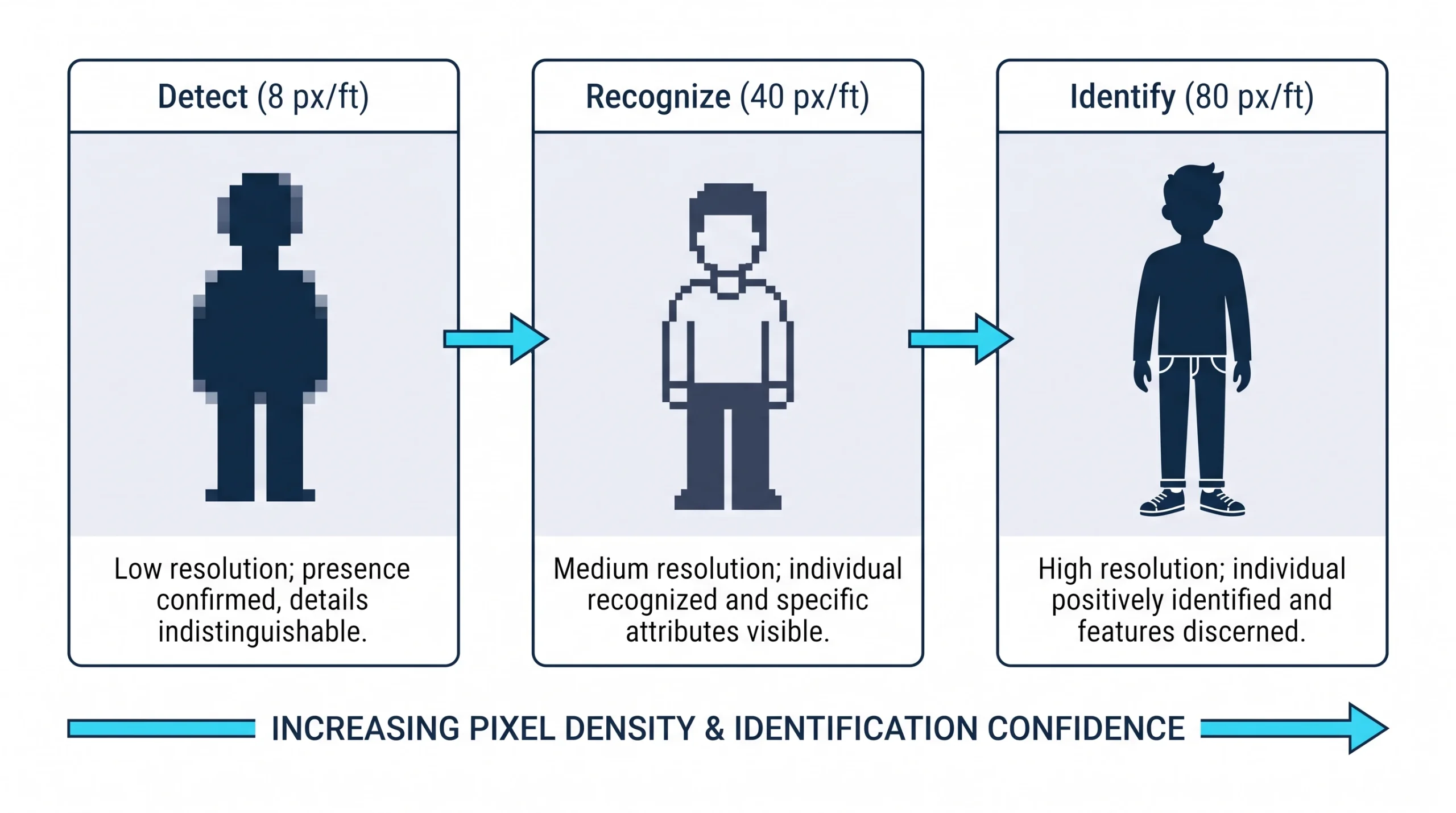
The three jobs have numbers behind them. Camera designers measure how many pixels land on each foot of the scene. Using the benchmarks Axis publishes from the IEC 62676-4 standard:
- Identify a stranger’s face: about 80 pixels per foot.
- Recognize someone you know, or follow an action: about 40 pixels per foot.
- Detect that a person or vehicle is present: about 8 pixels per foot.
Divide a camera’s horizontal resolution by those figures and you get the widest scene it can handle for each job.
Read it this way. A 4MP camera can identify faces only where its view is 32 feet wide or narrower at the spot people stand. Aim that same camera across a 120-foot parking lot and it delivers about 21 pixels per foot. You’ll see that a person crossed the lot. You won’t be able to say who.
That’s why one 4K camera can’t “cover the whole lot,” and why doorways are the cheapest place to get an identification. A door forces everyone through a spot three feet wide.
Security camera placement: rules that hold in any building
Doors first. Every exterior door gets a camera aimed to catch faces, mounted 7 to 9 feet high. Go higher and you record hat brims and the tops of heads.
Respect the glass. A camera pointed at a glass storefront sees silhouettes against daylight. Use a model with wide dynamic range, or move the camera so it catches people a few steps inside.
Watch the handoffs. Registers, safes, receiving desks and parts counters get a camera from above and slightly behind the employee, framed tightly enough to see hands.
Let cameras cover each other. The area directly under a camera is its blind spot. Place cameras so each one’s blind spot sits in another’s view. It also means anyone tampering with a camera is on camera.
Add light before adding cameras. Night-vision range on a spec sheet is optimistic. A $60 light fixture often improves a parking lot picture more than a second camera.
Stay out of private spaces. No cameras in restrooms, locker rooms, changing areas or anywhere else people undress. In Texas, recording a person in a place like that without consent and with intent to invade their privacy is a state jail felony under Penal Code § 21.15. Treat it as a hard line. Our guide to Texas security camera laws covers that along with the audio rules that catch more businesses.
Protect the recorder. It goes in a locked, air-conditioned room. A recorder on a shelf by the back door leaves with the burglar.
When the city sets your minimum: Dallas convenience stores
Inside Dallas city limits, convenience stores don’t get to choose their own floor. Dallas City Code Chapter 12B requires registered stores to run at least three color cameras of 2 megapixels or better at 15 frames per second. One covers the register. One captures a clear face view of everyone entering. One does the same for everyone leaving. Recordings must be kept at least 30 days, and a “STORE IS UNDER CAMERA SURVEILLANCE” sign goes at each public door.
Notice what the ordinance asks for: two of its three cameras are identification shots at a doorway. The city reached the same conclusion the pixel math does. Three is the legal minimum, though, and nobody should mistake it for a design. A store with gas pumps, a cooler and a back door needs more.
A worked count: Dallas showroom and warehouse
Take a 6,000-square-foot showroom with a small warehouse in the Dallas Design District, and walk it with the job list.
Twelve cameras. A package quote would have said eight or sixteen. The walk says twelve and tells you which twelve, and that’s the normal outcome when we design business security cameras in Dallas: the count comes from the building.
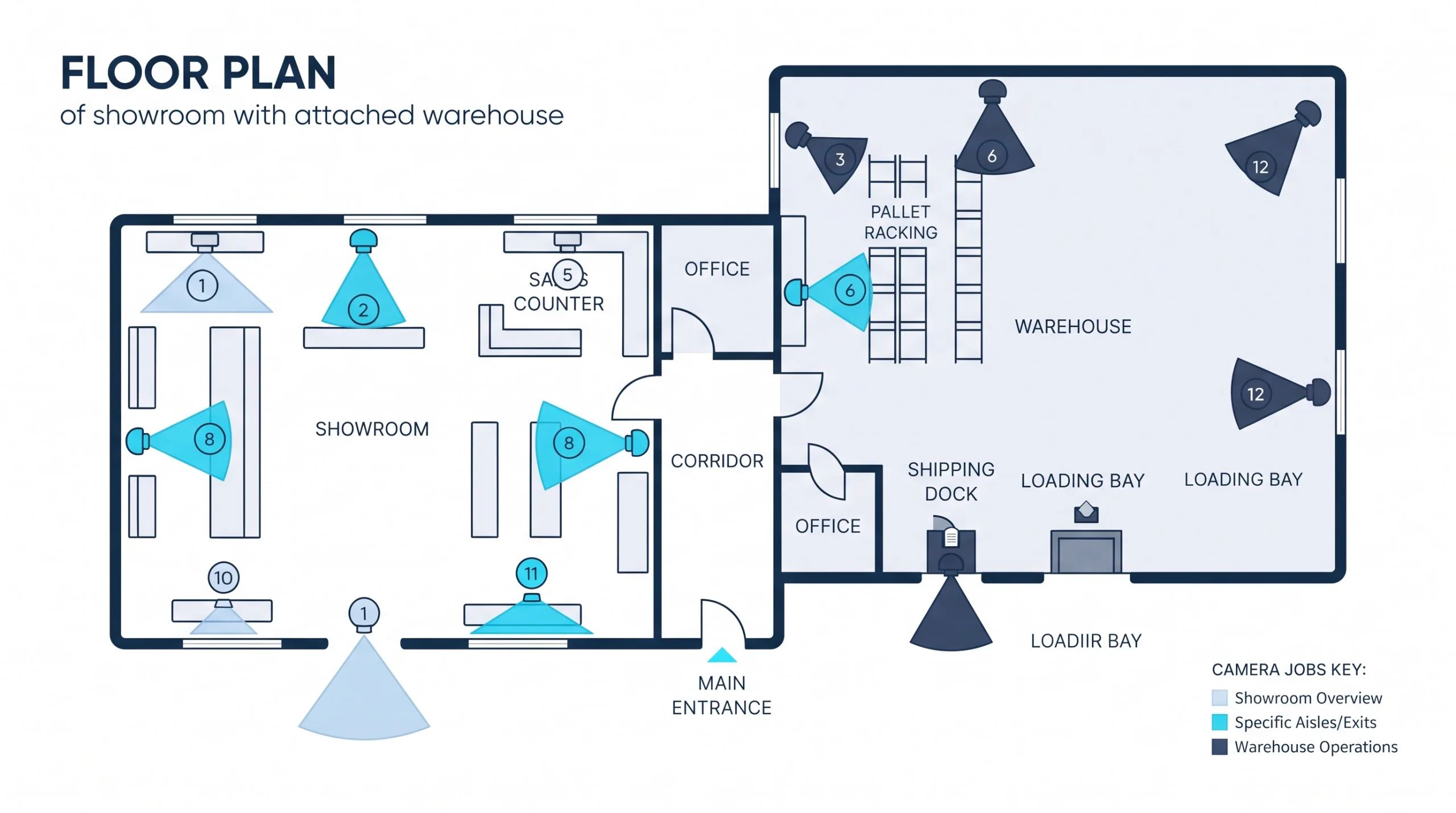
Want a count for your building? Send us a floor plan, even a phone photo of the fire evacuation map, and we’ll mark it up.
More cameras or higher resolution?
Our take: more cameras at choke points beats more megapixels in the middle of the room. Two 4MP cameras on two doors will identify everyone who enters. One 4K camera in the center of the ceiling will identify almost nobody.
Higher resolution earns its cost in wide scenes where you can’t control where people walk, such as a parking lot or a warehouse floor. A multi-sensor camera, which packs three or four lenses into one housing, can replace several cameras at a building corner and needs only one cable.
We’d skip a moving PTZ camera as primary coverage. It’s impressive in a demo and reliably pointed the wrong way when something happens. Fixed cameras first, and a PTZ only if someone is watching live.
What the count does to the budget
Each camera adds roughly $600 to $1,500 installed in the DFW market, and the recorder and storage grow with the count. Cutting cameras that have no job is the cleanest way to save money. Our security camera installation cost guide has full ranges and worked examples.
Frequently Asked Questions
How many cameras does a small business need?
Where should security cameras be placed?
How many cameras can one NVR handle?
Where should you not put security cameras?
Count the doors first
The number of cameras you need is the number of jobs you can name. Start at the doors, add the places where money moves, and stop when a camera has no job. For help matching the design to what your network and recorder can carry, our IT support and consultation team can review both on one visit.