
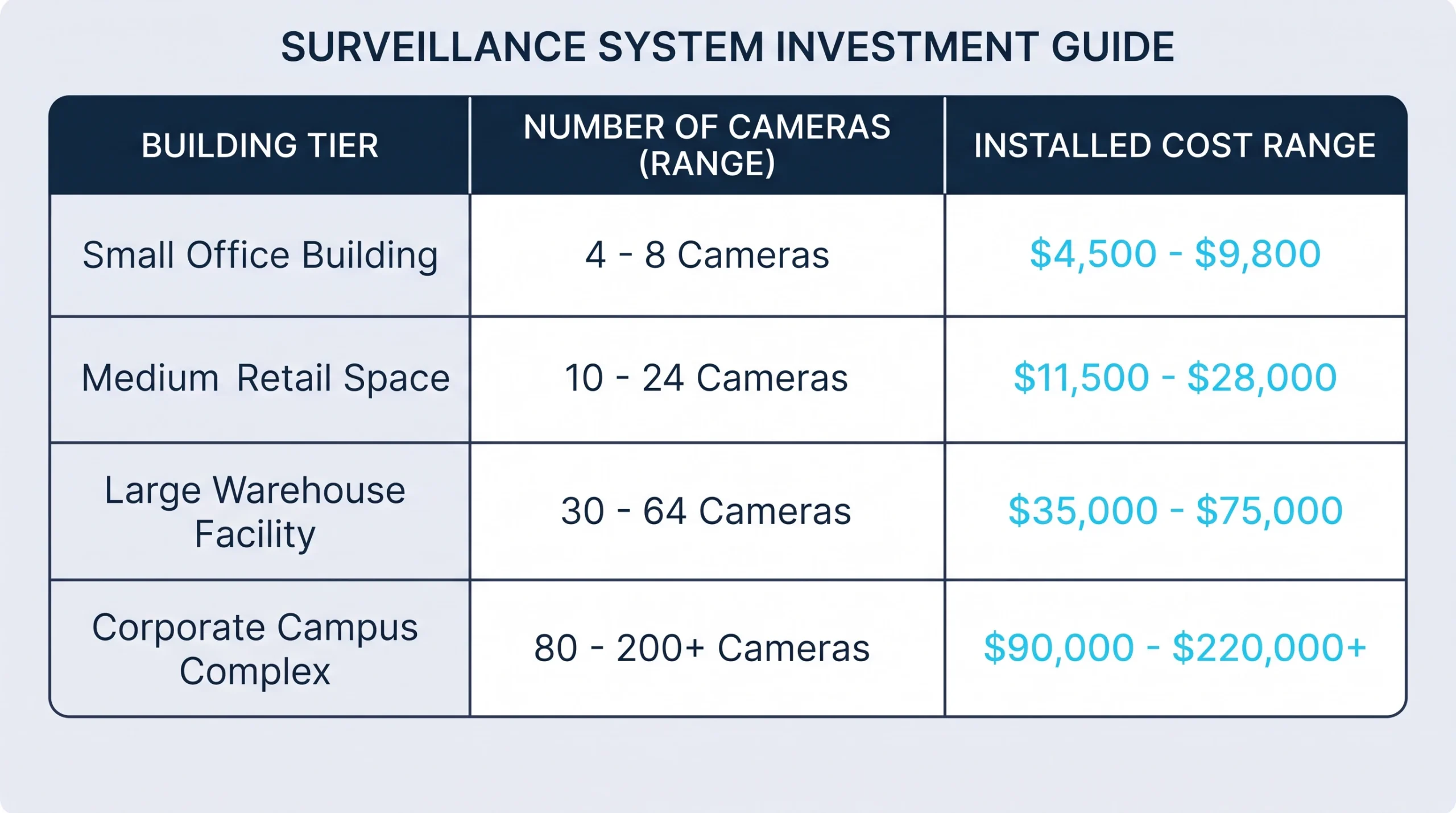
Security camera installation cost for a Dallas–Fort Worth business typically runs $600 to $1,500 per camera, fully installed. That puts a six-camera office near $5,000, a 16-camera retail or office space between roughly $11,000 and $22,000, and a 20-camera warehouse at $25,000 or more.
Those numbers cover the whole job: cameras, cable, recorder, network gear, labor and setup. They’re typical market ranges for professionally installed IP systems in North Texas, not a Texas Communication Services price list. We do commercial security camera installation across the metroplex, and two buildings the same size can land $8,000 apart for good reasons. This guide shows where the money goes, walks through three realistic scenarios, and flags the costs that tend to be missing from a first quote.
What drives security camera installation cost
Six levers account for nearly all of the spread between a low quote and a high one.
1. Camera type. A fixed 4-megapixel dome or turret runs $150–$450 for the hardware. Varifocal and 4K models run $350–$900. Multi-sensor, PTZ and license plate cameras run $1,200–$3,500 each. One specialty camera can cost as much as six standard ones.
2. Cable runs. In a finished office with a drop ceiling, expect $125–$300 per cable drop. A warehouse with 30-foot ceilings needs a lift, which adds a rental of a few hundred dollars a day and slows every run. Any run past 328 feet needs an extra switch or a fiber link.
3. Recorder and storage. An 8-channel recorder with drives runs $400–$900. A 16- to 32-channel unit runs $1,000–$3,500. Retention is the multiplier: going from 30 days of footage to 90 roughly triples the storage. Our NVR vs DVR breakdown covers which recorder fits which building.
4. Network gear and power. Cameras need a PoE switch ($300–$1,500) and should sit on battery backup ($150–$600) so a power blip doesn’t blind the system.
5. The design itself. Camera count is a design decision, and a good design often uses fewer cameras than a package deal. We cover the method in our guide to how many security cameras you need.
6. Software and licensing. Some systems carry a one-time license per camera. Cloud-managed systems charge monthly, commonly $8–$30 per camera depending on retention.
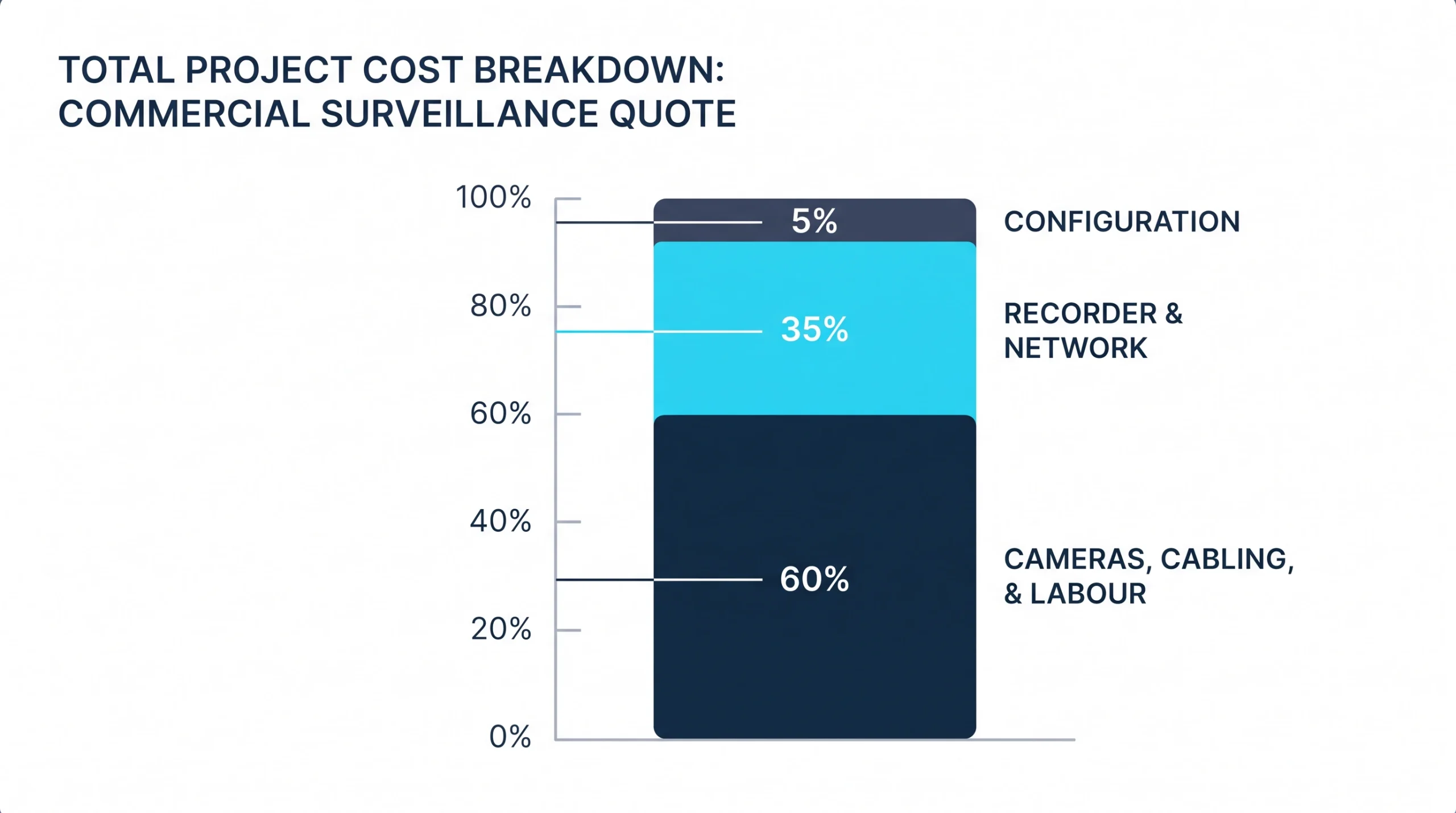
Where the money goes: a line-item view
If a quote shows “cameras” and “installation” as two lines and nothing else, ask what happened to configuration. That missing line is how recorders end up with default passwords, plugged straight into the office network.
Three DFW scenarios with realistic numbers
These are worked examples built from market-rate line items. Your building will differ.
The small office. A 2,500-square-foot insurance office on Camp Bowie Boulevard in Fort Worth: two entrances, a reception desk, a back hallway and a small parking lot. Five 4MP turrets at $250, one varifocal on the front door at $450, an 8-channel NVR with 8 TB, and six cable drops at $200 each. It’s the most common shape of job for camera installation in Fort Worth: one day on site, no lift, no surprises.
The warehouse. A 40,000-square-foot distribution building in north Fort Worth’s Alliance corridor with four dock doors and a fenced yard. Fourteen fixed cameras, four exterior varifocals and two wide-angle dock cameras feed a 32-channel NVR with 40 TB. The 20 drops average $350 because of ceiling height and distance, and the lift is on site for three days. Notice that cabling and the lift together cost almost as much as the cameras. That’s normal for high-ceiling space.
The multi-site group. A dental group with three offices across Tarrant County, 12 cameras each, all managed from one login. Cameras average $350, drops average $225, and each office gets its own 16-channel NVR and PoE switch. Configuration costs more here because someone has to build remote access and user permissions that work across all three sites. Add roughly $360 a month if the group wants cloud backup of key cameras and automated health alerts.
Want a number for your building? We’ll walk it and quote it. Request a site walk and you’ll get a design with camera positions, not a package with a camera count.
Hidden and ongoing costs nobody quotes upfront
Hard drives. Recorder drives run around the clock and commonly last three to five years. Budget $150–$400 per drive when they go.
Firmware and patching. Cameras and recorders are network devices with security flaws that get discovered and fixed. If patching is nobody’s job, it doesn’t happen. This is the practical case for letting your IT provider own the camera system too.
Internet upload. Cloud recording can saturate an office connection. Sometimes the fix is a setting. Sometimes it’s a bigger internet plan.
Trenching and electrical. A camera on a parking lot pole needs a cable path. If that means cutting asphalt, the trench can cost more than everything mounted on the pole.
Heat. This one is local. Recorders are commonly rated to about 104°F. A mezzanine, an unconditioned storage room or an attic in a Texas August runs well past that, and a cooked recorder takes its footage with it. Put the recorder in conditioned space, even if the cable runs get longer.
Equipment rules for federal work. If you hold federal contracts, Section 889 of the 2019 defense authorization act, implemented in FAR 52.204-25, bars video equipment from certain manufacturers. The cheapest cameras on the market are frequently the prohibited ones. Get compliance in writing before the order is placed.
An unlicensed installer. Texas treats a camera system that records images of property or people as a regulated security system under Occupations Code Chapter 1702, and companies that sell or install them need a license from the Texas DPS Private Security program. A quote that’s 30 percent under everyone else’s sometimes comes from a company that skipped that step. Ask for the license number. Ours is B10492801.
For city-level detail, our Dallas–Fort Worth camera installation guide covers local permits and licensing.
How to install security cameras yourself, and when that’s fine
A four-camera PoE kit with a recorder runs $400–$900, and a handy owner can install it in a Saturday. The honest sequence:
- Plan the views, starting with doors. Every exterior door gets a camera before anything else does.
- Run solid-copper Cat6 from the recorder location to each camera, using outdoor-rated cable where it’s exposed.
- Mount at 8 to 10 feet, aim, and seal every wall penetration.
- Change the default passwords, update the firmware, and keep the recorder off the open internet.
- Check the picture at night, then set the retention period.
DIY is reasonable for six cameras or fewer in a single-story building you own, with a drop ceiling or an accessible attic, where no insurer or regulator depends on the footage. Texas law exempts an owner installing a burglar detection or alarm device on their own property (§ 1702.328). The licensing rule is aimed at companies doing it for others.
Hire it out when you’re past eight cameras, working at height, mounting on poles, or sharing a network with business systems.
Our take: DIY the mounting if you enjoy it. Don’t DIY the network side. An exposed recorder is a well-known way into a small business network, and no amount of ladder work fixes that.
How to spend less without regretting it
- Buy fewer, better-placed cameras. One camera aimed at a doorway beats three aimed at a room.
- Skip the 4K upsell in small spaces. In a 1,200-square-foot office, 4MP identifies faces at every door. 4K mostly doubles your storage bill.
- Reuse good coax. A hybrid recorder can run new cameras over existing coaxial cable and save the cost of re-cabling.
- Cable everything now, add cameras later. Pulling two extra cables while the ceiling is open costs little. Coming back for them costs a full visit.
- Match retention to a real requirement. Ask your insurer what they expect before paying for 90 days.
- Combine trades. Cameras and door access share cable paths and often a site visit. If you’re pricing both, see what access control costs per door and ask for one combined quote.
If it were our building: we’d put the money into the entrance cameras and the recorder, and economize on hallway and overview cameras. Entrances are where identification happens, and the recorder is the one part whose failure costs you everything.
Compare camera quotes using the same five-year budget
A lower installation price can hide a higher ownership cost. Compare the same camera positions, recording settings and support scope before comparing totals. Use this worksheet for each proposal:
Five-year planning total = installation + (monthly subscriptions × 60) + planned maintenance and replacement allowances. Keep taxes, financing and future expansion as separate lines unless the quote explicitly includes them.
| Budget item | Proposal A | Proposal B |
|---|---|---|
| Installation | $8,000 | $11,000 |
| Subscription assumption | $100/month | $0/month |
| Maintenance/replacement allowance | $1,000 | $2,000 |
| Five-year planning total | $15,000 | $13,000 |
Proposal B costs $3,000 more upfront but $2,000 less over five years under these assumptions. That does not make it automatically better: check whether the subscription in A includes storage, updates or replacement services that B excludes. Change the assumptions to match the written proposals.
Ask for these acceptance checks in writing
- Coverage: mark each camera position and the task it must achieve, such as identifying someone at a doorway rather than simply showing movement.
- Day and night evidence: request sample footage at the actual distances and lighting conditions, including glare at entrances.
- Retention: specify resolution, frame rate, recording schedule, usable storage and target retention days together. A drive-size figure alone is not a retention guarantee.
- Handover: confirm who owns administrator access, how an authorized user exports a clip, and who receives storage or camera-offline alerts.
- Support: identify included updates, callout charges, subscription increases, warranty exclusions and the process for leaving the provider.
For the equipment decision, use our commercial camera brand comparison. Bring the completed worksheet and a floor plan to your site assessment so the proposals can be compared on the same scope.
Frequently Asked Questions
How much does it cost to install security cameras at a business?
How much does it cost to install 4 security cameras?
Is it cheaper to install security cameras yourself?
How long does a commercial camera installation take?
Do you need a license to install security cameras in Texas?
Get a number you can plan around
Price ranges only go so far. The real figure comes from walking the building, counting doors and checking what the network can carry. Since the cameras will live on that network, a network assessment is a sensible first step, and it’s one we can do on the same visit as the camera walk.