
NVR vs DVR comes down to cable. An NVR records digital video from IP cameras over Ethernet. A DVR records analog video from cameras on coaxial cable. For any new business installation, choose an NVR. A DVR makes sense only when you already have good coax that would be expensive to replace.
That verdict covers nine decisions out of ten. The tenth is the interesting one, and it’s common in older North Texas buildings: a working coax system sits in the walls, the picture is poor, and someone has quoted a full tear-out. Before approving it, know that there are three options on the table, not two. We design business camera systems around all three, and the right one depends less on the recorder than on what’s above your ceiling.
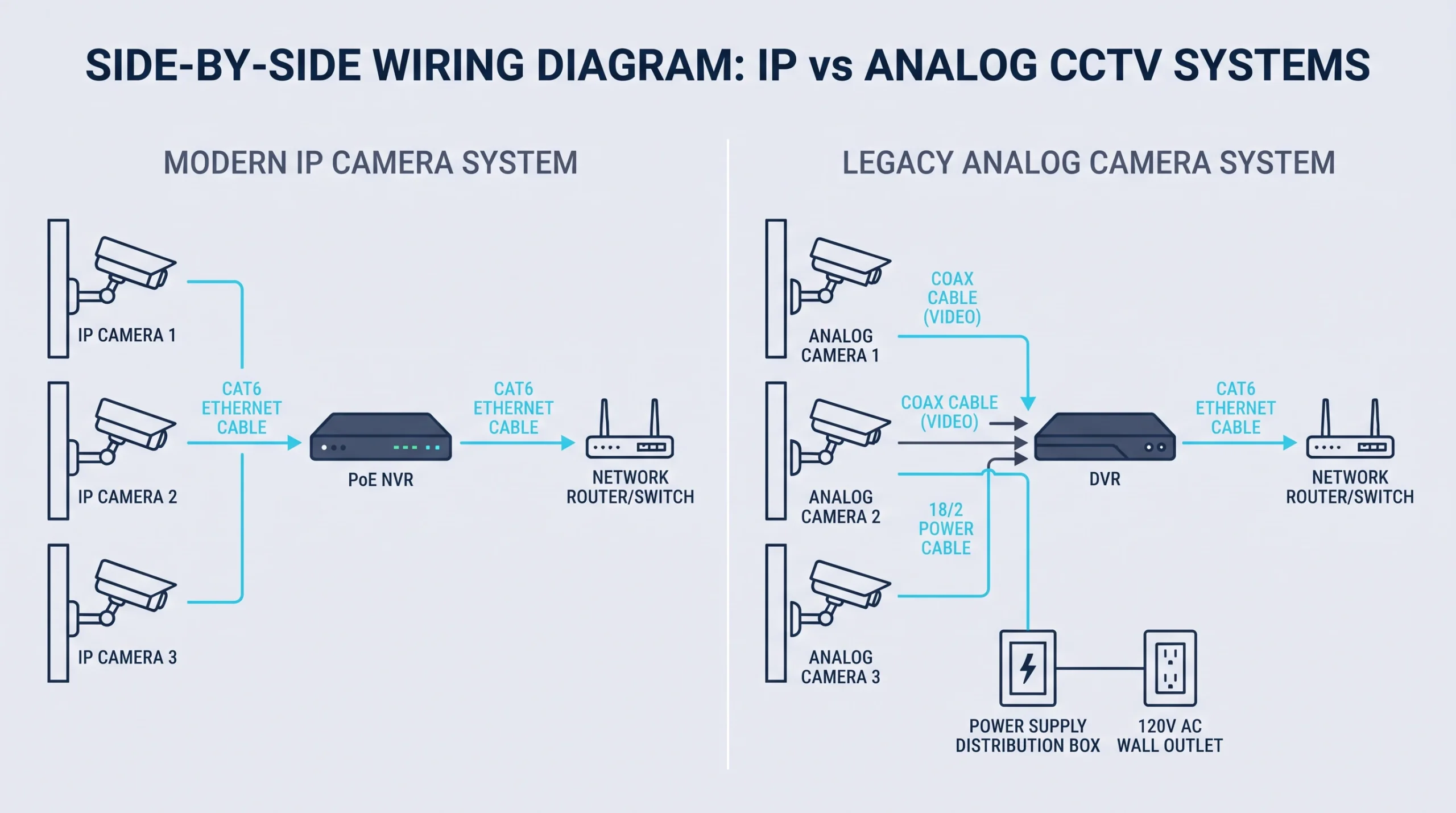
What’s the difference between an NVR and a DVR?
NVR stands for network video recorder, DVR for digital video recorder. Both store footage on hard drives. The difference is where the video becomes digital. With an NVR, each IP camera encodes its own video and sends data over the network. With a DVR, cameras send an analog signal and the recorder does the encoding.
That one design difference drives everything else. A camera that’s also a small computer can do more: higher resolution, on-board detection of people and vehicles, and power over the same cable. It can also be attacked like a computer.
Image quality
NVR systems win, though by less than they used to. Modern analog-over-coax cameras reach 5MP and even 8MP, which is plenty to identify a face at a doorway. Where IP pulls ahead is in difficult scenes. Better sensors, better handling of backlit glass doors, and smart detection that tells a person from a swaying tree all show up on the IP side first.
Our take: resolution is rarely the deciding factor anymore. If someone is selling you an NVR system purely because “it’s higher resolution,” they’re skipping the better arguments.
Cabling and installation
This is the real divide. An IP camera needs one Ethernet cable that carries both video and power, a setup we explain in our piece on what a PoE camera is. An analog camera needs coax for video and a second conductor for power, usually bundled together as “siamese” cable.
For new construction or an open ceiling, Ethernet is the easy call. It’s the same cable as your computer network, and it will carry whatever camera you buy ten years from now.
Coax has one physical advantage: distance. Ethernet tops out at 328 feet per run before it needs a switch or extender. Analog HD signals commonly travel 500 feet or more on good RG59.
Cost
Per channel, DVR systems are cheaper. Analog cameras and recorders usually cost noticeably less than comparable IP gear. But the equipment is the smaller half of most quotes. Labor and cable are the larger half, and those depend on your building, not on the recorder. Our commercial camera installation price guide breaks down the per-camera math.
If you’re pulling new cable anyway, the DVR savings are small and you give up the upgrade path. If the cable’s already there and tests good, the savings can be thousands.
Security and upkeep
An NVR and its cameras are network devices. They have firmware, passwords and vulnerabilities, and they sit on the same network as your accounting system unless someone deliberately separates them. Three things should be true of any NVR install:
- Cameras and recorder sit on their own network segment, walled off from business computers.
- Default passwords are changed and firmware is on an update schedule.
- Remote viewing goes through the vendor’s secure service or a VPN, never an open port on the firewall.
A DVR is less exposed because its cameras aren’t on the network at all. The recorder still is, the moment anyone wants to view footage from a phone. This is the part of a camera project that belongs to IT, and it’s why we treat every recorder as a server that happens to store video.
Storage and retention
The storage math is the same for both. As a rule of thumb, a 4MP camera recording continuously with modern compression produces about 20 GB a day. Eight cameras kept for 30 days need roughly 5 TB. Recording only on motion can cut that by half or more in a quiet office. Real numbers vary with the scene, so size drives from a test recording, not a brochure.
NVR vs DVR for business: which to choose
Choose an NVR if:
- You’re installing a new system or the ceiling is open.
- You expect to add cameras, sites or smart detection later.
- You want cameras from more than one brand. Look for ONVIF conformance, the interoperability standard that lets one maker’s camera talk to another’s recorder.
- Someone is going to manage the network side properly.
Choose a DVR if:
- You have existing coax in good condition and hard ceilings that make new cable expensive.
- You need a few very long runs.
- The system is small, the budget is fixed, and you don’t expect to grow it.
Hybrid recorders and other edge cases
Hybrid recorders. A hybrid recorder accepts both coax and IP cameras. It’s the option missing from most sales conversations, and often the smart one: keep the coax where it’s good, add IP cameras where you’re running new cable, and migrate over years instead of in one invoice.
Here’s how that plays out. Take a dental practice near Legacy Drive in Plano with eight analog cameras installed in 2013. The building has drywall ceilings, so every new cable means cutting and patching. Typical market numbers for the three paths:
The middle path gives the practice most of the image improvement for a third of the money. The hybrid adds a way forward. Which one we’d recommend for camera installation in Plano depends on a ten-minute test of the old cable. Corroded connectors and cheap copper-clad cable won’t carry a 5MP signal, and it’s better to learn that before the cameras are ordered.
Not sure what’s in your walls? Send us a photo of your current recorder and the back of one camera. We can usually tell you which of the three paths is open to you.
No recorder at all. Some cloud cameras store video on a memory card and upload it, with no box on site. That’s a different decision, covered in our look at wired vs wireless trade-offs.
Heat. Whichever recorder you choose, keep it out of the attic and off the mezzanine. Most are rated to about 104°F, and an unconditioned Texas storage room passes that for months of the year.
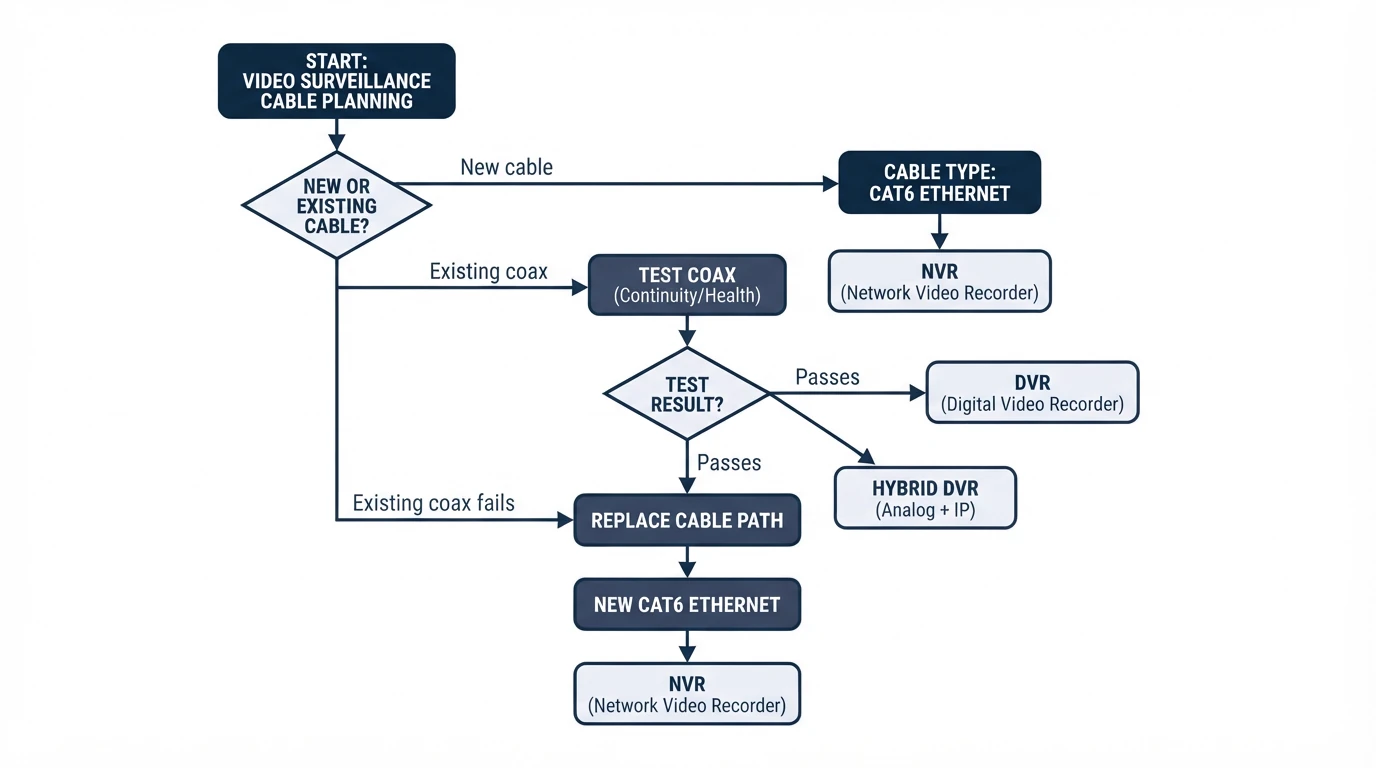
If it were our building: on a new build, NVR without a second thought. In a finished building with sound coax, we’d test the cable, go hybrid, and spend the difference on the two cameras that watch the doors.
Frequently Asked Questions
Which is better, NVR or DVR?
Can you use IP cameras with a DVR?
Does an NVR need internet to work?
What does NVR stand for?
How long does an NVR keep footage?
Start with the cable
The recorder decision is really a cable decision, and the cable decision is really about your ceiling. If you’d like someone to look at what you have before anyone quotes a replacement, talk to an IT specialist and we’ll test the existing runs first.