
The five types of access control are discretionary (DAC), mandatory (MAC), role-based (RBAC), attribute-based (ABAC) and rule-based. Each one answers the same question a different way: who decides what a person is allowed to open? Most DFW offices should run role-based access with a few time rules layered on top.
These models come from IT security, and they apply just as well to doors. That suits us, because we install commercial access control systems and manage the networks behind them. So each type below gets two examples, one at a door and one on a computer. In a well-run office, the two should match.
What is access control in security?
Access control is the set of policies and technology that decides who can enter a place or use a resource, when, and under what conditions. Physical access control governs doors, gates and cabinets. Logical access control governs files, applications and networks. The decision logic behind both is the same.
Every system, from a fob reader to a Microsoft 365 login, runs the same four steps. You identify yourself with a credential. The system authenticates that the credential is valid. It authorizes the request against a policy. Then it logs what happened. The five models below differ only in step three: how the policy is written, and who gets to write it.
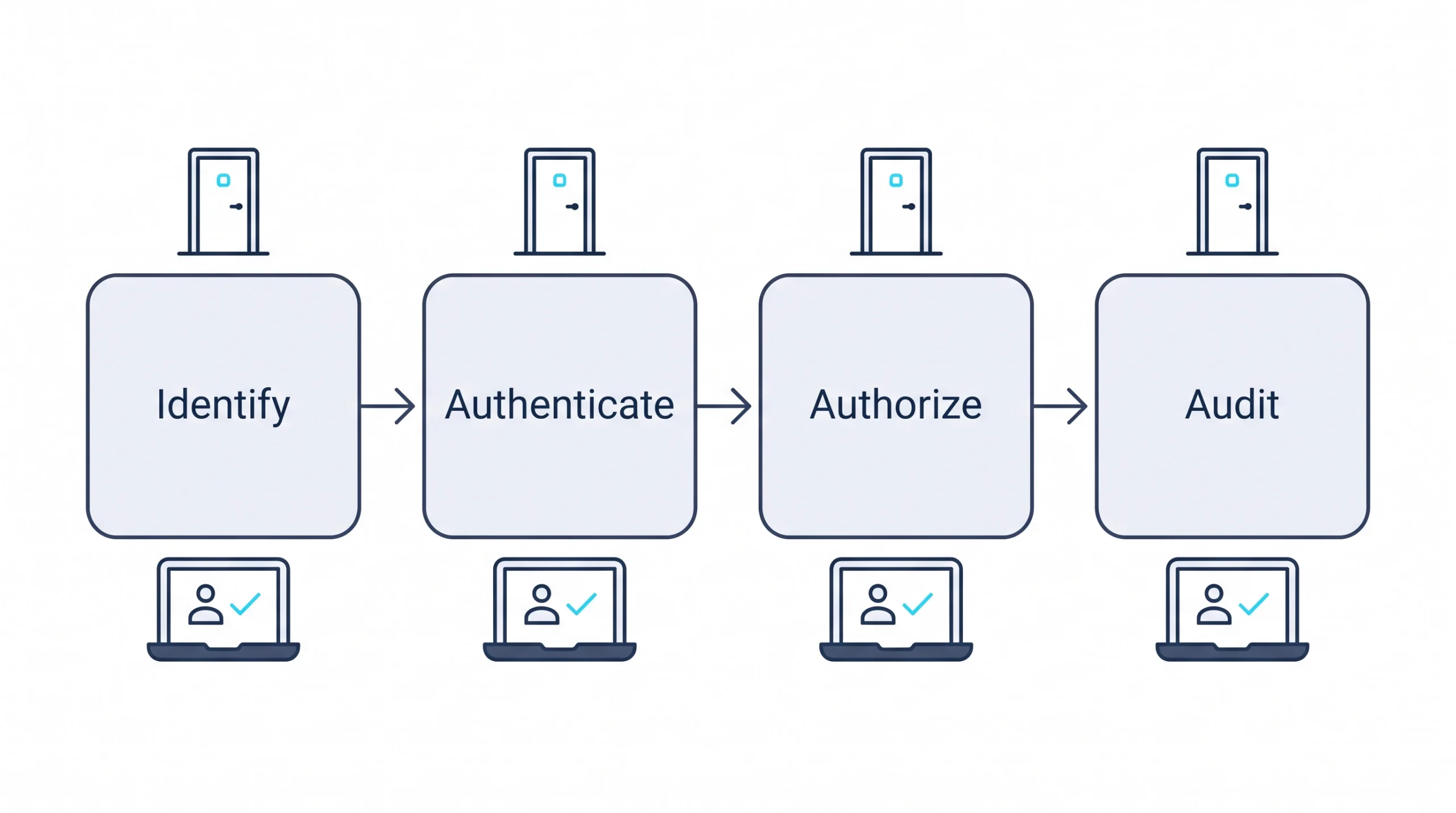
The 5 types of access control at a glance
1. Discretionary access control (DAC)
Whoever owns the resource decides who else gets in. The sales manager adds two new reps to the sales suite door. You share a folder with a coworker because you created it.
DAC is quick, and that’s also the problem. Permissions pile up one favor at a time, and nobody holds the full picture. On walkthroughs, the first thing we do with an existing system is export the active credential list. In a DAC shop, that list reliably includes people who left the company years ago.
It’s fine for a five-person office where the owner personally knows every key holder. Past roughly 15 people, it starts leaking.
2. Mandatory access control (MAC)
A central authority classifies both the resource and the person, and the system enforces the match. Individual users can’t override it, including the person who created the file or manages the room.
At a door, MAC looks like a controlled area that opens only for staff holding a specific clearance, whatever their title or their manager’s wishes. On computers, it’s the model behind classified government systems. North Texas defense subcontractors run a mild version of it around the rooms and systems where controlled unclassified information is handled.
MAC is rigid by design. That rigidity is what you’re paying for, and most commercial offices don’t need it building-wide.
3. Role-based access control (RBAC)
Permissions attach to roles, and people are assigned to roles. NIST describes it as access control based on the roles users hold, where each role carries the authorizations a job function needs.
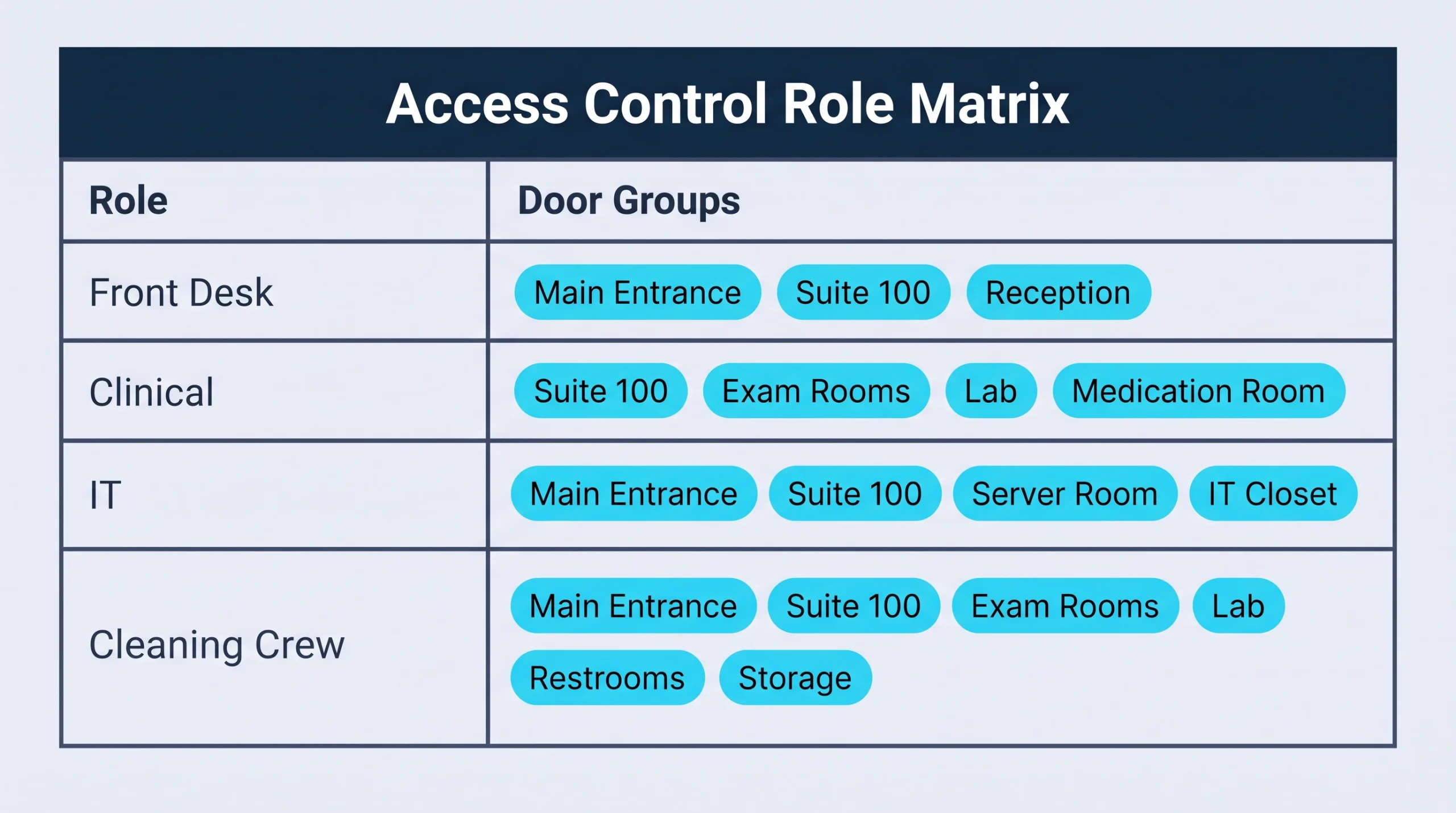
At the door: “Front desk” opens the lobby and the supply room. “Clinical” adds the treatment wing. “IT” adds the server closet. On the network, the same idea is a security group: put someone in the Accounting group and they get the accounting share, the accounting software and nothing in HR.
The payoff is onboarding and offboarding. A new hire gets one role and every door and folder follows. When someone leaves, removing the role removes all of it at once. For a 10 to 200 person business, this is the default we recommend.
4. Attribute-based access control (ABAC)
ABAC evaluates several attributes against a written policy before it says yes. NIST’s SP 800-162 defines it as granting access based on attributes of the user, the resource, the action requested and sometimes the environment.
A door example: the lab opens for an employee whose department is Engineering, whose home site is this building and whose safety certification hasn’t expired. Let the certification lapse and the door stops opening, without anyone editing a permission. The IT equivalent is a Conditional Access policy that checks who you are, whether your laptop is company-managed and where you’re signing in from.
It’s more precise than roles and it takes more upkeep. Attributes have to be accurate, which means HR data, training records and the door system all have to agree.
5. Rule-based access control
Rules apply to everyone, regardless of identity. The front door unlocks at 8 a.m. and relocks at 5 p.m. Nobody badges in after 10 p.m. without a manager’s override. A badge that entered the parking garage can’t enter it again until it has exited. On the network, firewall rules work this way.
Rule-based control rarely stands alone. It’s the layer that goes over roles: the cleaning crew role opens the common areas, and a rule limits that role to Tuesday and Thursday evenings.
Which type of access control is right for a small business?
Role-based access with a handful of rules is right for most small businesses. Define four to six roles that mirror real jobs, add schedules for doors and for outside vendors, and review the assignments quarterly. Add attribute-based policies only when you have multiple sites or compliance requirements that roles can’t express.
Here’s how that plays out. A 40-person architecture firm in Plano’s Legacy area has a lobby door, a rear entrance, a plotter room, an IT closet and a principals’ wing. Five roles cover it: Staff, Principals, IT, Cleaning and Visitor. Two rules sit on top. The lobby unlocks during business hours, and Cleaning works only between 6 and 9 p.m. on two set nights.
The part most door vendors can’t do is the next step. Because we also provide managed IT services in Plano, we map those door roles to the firm’s Microsoft Entra ID groups. Disable a departing employee’s account at 4:55 on a Friday and the badge dies with the login. One action, one audit trail.
Our take: the model matters less than the discipline of having one. A plain RBAC setup that someone reviews every quarter beats an elaborate policy engine nobody maintains.
Not sure which roles your office needs? Tell us how your office is laid out and we’ll sketch a role map with you.
Two common mix-ups
Credentials aren’t types of access control. Fobs, PIN codes, phones and fingerprints are ways to prove who you are. They’re step one and two of the four steps. The model is step three. You can run RBAC with any of them, and we cover the choices in our guides to phone-based credentials and cloud management and biometric access control.
More granular doesn’t mean more secure. Every extra role and exception is something a person has to remember to update. The breaches we see at the door are almost never clever. They’re a contractor’s fob that was never turned off.
If it were our building: five roles, two schedules, one calendar reminder every quarter to review the list. That’s the whole policy.
What does it cost?
The model itself is free. It’s a setting in software you’d be buying anyway. The hardware is where the money goes, typically $1,500–$3,500 per door installed in the DFW market, plus a monthly fee if the system is cloud-managed. Our per-door access control pricing guide breaks that down by door type.